Manage leads, billing, and spam reports
Understand your ten included qualified leads, choose whether to continue paid capture, manage cancellation, and report leads for spam review.
Updated
Your website stays free. Each newly onboarded site includes ten qualified leads across its selected integrated contact options, with no payment method and no expiration date. Paid lead capture continues only if you choose to accept an offer at Checkout.
Review incoming leads
Open Leads in your dashboard to review captured enquiries. Selected forms, quick contact, chat, on-site appointment requests, and qualifying tracked calls can create leads. You can also receive email notifications when new leads arrive.
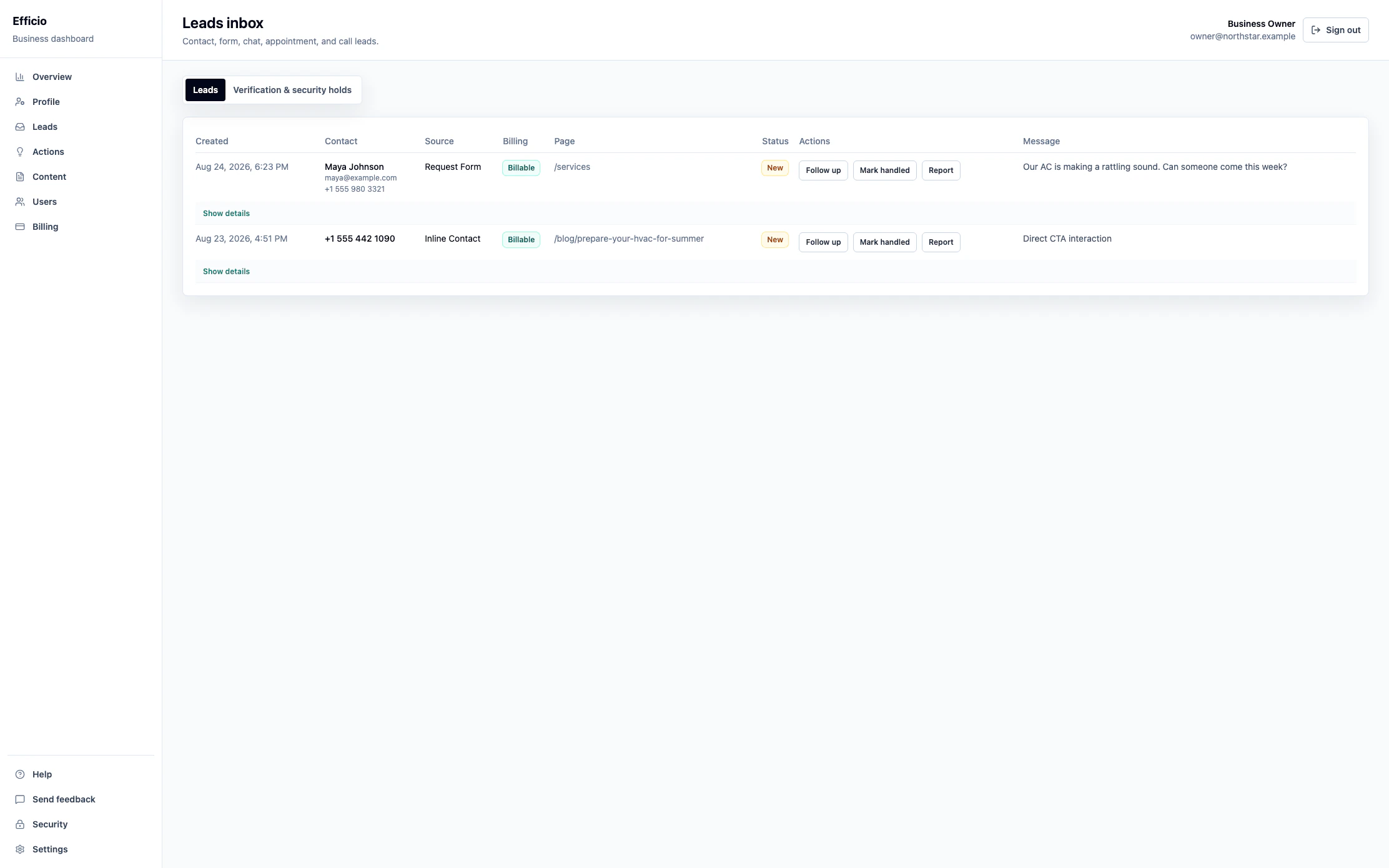
Review your inbox and respond to visitors yourself. A qualified lead is a captured interaction that meets the applicable billing rules—not a guarantee of a sale, a booked customer, or commercial value.
What uses your included leads
Each qualified form submission, quick-contact message, chat, confirmed appointment request, or qualifying tracked call uses one included lead. External booking and order clicks are free analytics-only actions and do not use the allowance. Clicking a call button alone is not a qualified tracked call.
Call confirmation is included when Call is selected. A connected call must meet the configured qualification rules, which can include being answered, a minimum duration, and per-caller deduplication. Maintain your own public business number and promptly verify routing changes; tracking numbers are provider-controlled and are not permanent business numbers.
After your tenth qualified lead
Without completed Checkout, your selected integrated contact options pause after the tenth qualified lead. No automatic charge is created. Your website, content, domain, business details, existing leads, and free external links stay online.
You can complete Checkout before or after the allowance is used. Completing it early does not remove unused included leads. You can also turn capture off and keep the remaining allowance for later.
Choose paid continuation
- As an owner or admin, open Business details to choose captured sources.
- Review your remaining included leads and the after-allowance rates in the dashboard.
- Open Checkout and review the current offer, including prices, billable sources, billing terms, and cancellation method.
- Complete Checkout only if you want to authorize pay-per-qualified-lead billing. Charges apply to eligible new qualified leads after your applicable allowance.
| Classification | General rate |
|---|---|
| Tier 1: high-intent qualified leads | $2 each |
| Tier 2: initial-contact qualified leads | $1 each |
| External booking and order clicks | Free analytics only |
Review the current offer before accepting it. Your accepted Checkout or written offer controls your applicable pricing and commercial terms. Creating an account, publishing, using included leads, or merely storing a payment method does not authorize a charge.
Turn capture off or cancel paid service
Owners and admins can change selected capture options under Business details. Turning capture off pauses new Efficio-captured leads, but it does not cancel an existing subscription.
To cancel paid service, use Manage billing to access the billing portal and follow the cancellation controls. Cancellation takes effect according to your applicable billing terms. It does not automatically refund earlier charges or remove usage already incurred.
Report a lead as spam
- As an owner or admin, open the lead in your dashboard.
- Use the available Report control to submit it for spam review.
- If the reporting feature is unavailable or you need help with a charge, email support@effic.io.
Reporting places the lead in review; it does not automatically invalidate it, void a charge, or waive an invoice. Pending usage may be held from reporting to Stripe while an Efficio admin reviews the lead.
- If we confirm spam before the lead is reported to Stripe, the pending billable event may be voided.
- If we determine it is not spam, it may return to billable status and be reported to Stripe if otherwise eligible.
- Usage already reported to Stripe, closed invoice periods, and other billing limitations may require manual reconciliation rather than automatic reversal.
Efficio admins make the final decision on spam status and any void, waiver, credit, refund, or other billing adjustment.